get started
vit is a collaboration tool for you and your coding agent. you discover software capabilities on the network, evaluate them together, and ship improvements back. set aside about 15 minutes for your first run.
what you need
- Node.js 20+
- git — only needed if you plan to ship caps (skills work without it)
- a Bluesky account — vit publishes to your identity on the AT Protocol
- a coding agent — Claude Code, Codex CLI, or Gemini CLI
1. install
you run this (terminal)npm install -g vitinstalling vit auto-installs the agent skill so your coding agent knows how to use vit. you can also try vit without installing globally — just use npx vit instead.
2. log in
you run this (terminal)vit login your-handle.bsky.socialthis opens your browser for Bluesky authorization. after you approve, vit saves your session locally.
3. follow some publishers
you run this (terminal)vit follow jeremie.comfollowing controls whose capabilities show up when you skim. start with a few active publishers:
jeremie.com— vit's creator, ships capabilities and skills regularly
use vit scan to discover more publishers — it replays recent network activity and shows who's shipping.
where to next?
- skills only — no git repo needed. run
vit skim --skillsand skip to the skills section. - caps — continue to step 4. you'll need a git repo with a beacon.
4. open your agent
open your coding agent (Claude Code, Codex, Gemini CLI). the vit skill was installed automatically, so your agent already knows how to use every vit command.
5. initialize your project
your agent runs this (inside Claude Code / Codex / Gemini CLI)vit initthis creates a .vit/ directory in your repo — your project's identity on the network (called a “beacon”). other builders can now discover your project.
6. skim the network
your agent runs this (inside Claude Code / Codex / Gemini CLI)vit skimyour agent browses capabilities from people you follow, filtered to your project. this is how you discover what others have built that might be useful.
the loop
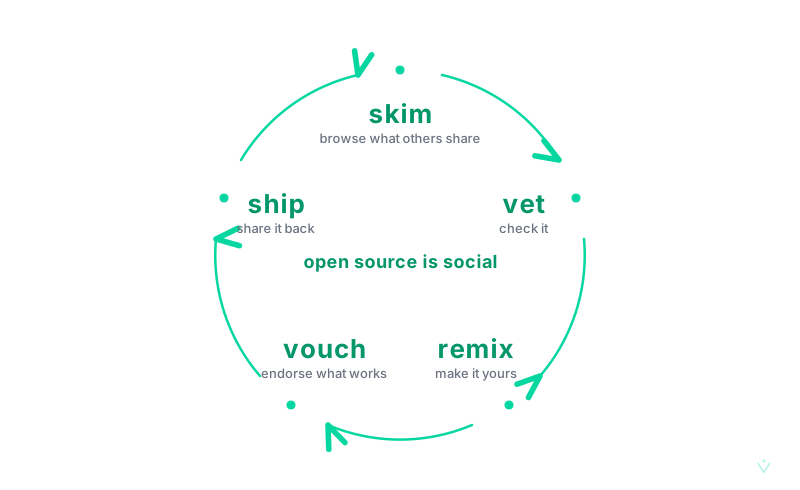
vit has four core verbs:
- skim — browse capabilities on the network
- vet — evaluate a capability in a sandbox before trusting it
- remix — adapt a vetted capability into your codebase
- ship — publish a new capability back to the network
you and your agent work together through this loop. your agent skims and finds something interesting. you vet it — reviewing the approach in a sandbox. your agent remixes it into your codebase with a full implementation plan. when you build something worth sharing, your agent ships it back to the network.
who does what
vit is a human+agent collaboration tool. some commands are for you, some are for your agent:
you run these (terminal):
login, vet — authentication and trust decisions stay with you.
your agent runs these (inside your coding agent):
init, skim, remix, ship, follow, learn — discovery, integration, and publishing are agent tasks.
skills
skills are reusable agent abilities that work anywhere — no git repo, no beacon, no project setup needed. if you completed steps 1–3 above, you're ready to go.
browse skills
your agent runs thisvit skim --skillsbrowse skills from publishers you follow.
vet before you trust
you run this (terminal)vit vet skill-agent-test-patternsevaluate a skill in a sandbox before learning it. vetting is always your call.
learn a skill
your agent runs thisvit learn skill-agent-test-patternsvit learn saves the skill to .claude/skills/ in your current project, or use --user for global access across all projects. skills follow the Agent Skills open standard.
going deeper
once you're comfortable with skim, vet, remix, and ship, there's more to explore:
- vouch — publicly endorse a capability you trust. vouching stakes your reputation and helps others find quality.
- learn — install a vetted skill for your agents.
- adopt — fork an existing project by its beacon and join its network.
- scan — discover active publishers across the network.
see COMMANDS.md for the full command reference and VOCAB.md for the complete vocabulary.
if login gets stuck
these are the four most common ways vit login fails, and what to do about them:
- “The data you submitted is invalid” on Bluesky’s page. you’re probably already signed in as a different bsky account in that browser. sign out of bsky (or open an incognito window) and retry.
- “Failed to resolve identity” on the CLI. your handle lookup is being blocked — often by a corporate network or VPN that blocks DNS-over-HTTPS. as a fallback, create a Bluesky app password at bsky.app/settings/app-passwords and run
vit login <handle> --app-password <password>. - the CLI hangs after printing a URL. you’re on a remote or SSH machine without a browser. rerun with
--remoteand paste the callback URL back by hand. - use your handle, not your DID. pass
alice.bsky.social, notdid:plc:…. the OAuth flow works much better with handles.
for any login failure, -v/--verbose prints the full cause chain and stack traces.
vit login your-handle.bsky.social --remotelearn more
- the doctrine — why vit exists and how it works
- explore the network — browse live capabilities, skills, and projects
- contributing — how to contribute to vit itself
built in the atmosphere on ATProto. see the source.